Proof, not promises.
LUKS2 on by default. Secure Boot end-to-end. Every release must pass a full encrypted install before it can ship — and you can verify every claim yourself.
Full-disk LUKS2, on out of the box
The installer sets up LUKS2 full-disk encryption by default, with an opt-out during setup, using the modern argon2 KDF. You unlock with your passphrase at boot — deliberately no keyfile is stashed on disk to weaken it — and the release gate re-verifies exactly that layout on every gated install.
A signed chain from firmware to kernel
UEFI Secure Boot works out of the box: the signed shim → GRUB → kernel chain is validated end-to-end — including the firmware fallback path, so a fresh machine with Secure Boot enforcing boots first try. Out-of-tree (DKMS) modules are signed through a MOK whose key is generated on this machine and never leaves it, and module-load-under-enforced-SB is verified in our Secure Boot VM tests — so a tampered or unsigned module won't silently load.
Boot security you can actually see
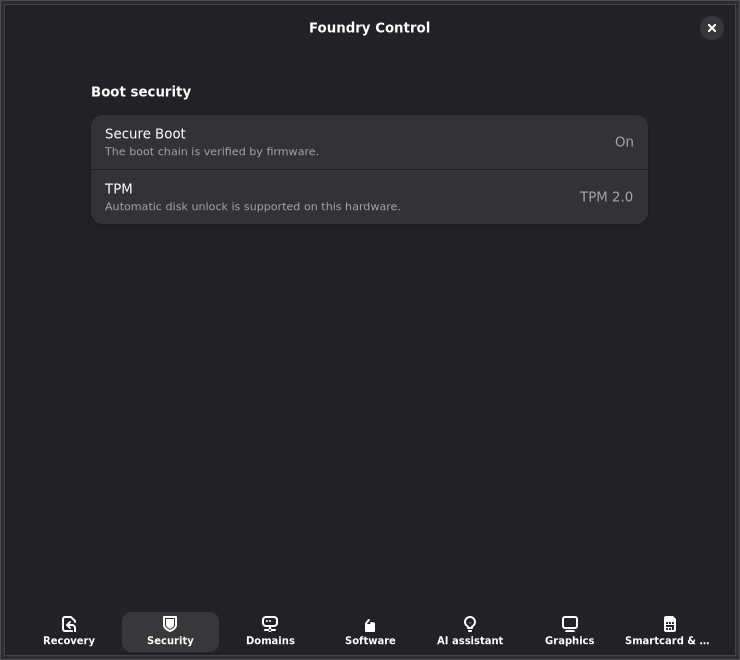
If Secure Boot is off, the boot splash says so — quiet, factual text, not a scare triangle. Foundry Control's Security page shows the live Secure Boot state and TPM capability in plain language, so "am I actually protected?" has a one-glance answer.
Untrusted software goes in a Crucible
Crucibles are disposable workspaces for building and trying software — sealed by default with no access to your files, read-only sharing when you opt in, rootless (no daemon, no root), and gone without a trace when deleted. The base system never meets the experiment.
apt can't delete your desktop
A guard refuses any transaction — on both the apt and offline-update paths — that would remove the desktop or core system packages. It's on by default, so a tired `apt` or an offline update can't brick the machine.
It recovers before you have to
A boot-counting engine watches for trouble. Consecutive unhealthy boots are automatically routed to the last-known-good snapshot from the bootloader — recovery without a rescue USB.
Nothing leaves the machine by default
The optional AI reasoner is off by default and runs on-device or on your own LAN. With it off, no system data is ever sent anywhere; when on, reports are redacted (hostnames, IPs, serials, tokens stripped) before anything is built.
Inspectable, deterministic builds
The whole OS is produced from one repository by a deterministic live-build — no hand-tweaked images. Anyone can read the config to know exactly what's on the system and why.
A release that fails to install cannot ship
Publishing is mechanically blocked unless a real, headless, fully-encrypted install — boot, disk layout, runtime checks, and snapshot rollback — passes on the exact release commit. The installer is driven through the accessibility tree (the same interface assistive tech uses). There is no override flag: changing a sealed gate requires a visible, signed commit and a deliberate re-seal by a human key holder.
The tests that gate a release are sealed
The acceptance specs and security checks behind the release gates are cryptographically sealed, and only a human key holder can seal them. Development — human or AI — cannot quietly rewrite a failing test into a passing one: change a sealed check and the gate goes red until a person re-seals it deliberately.
The signing key has never touched a developer's disk
The production APT archive key was generated in a RAM-backed keyring and has never been written to any developer machine. It exists only as a CI secret and one offline vault backup — signing happens in an ephemeral CI keyring discarded when the job ends. The fingerprint is published below so you can verify it from a second channel, independent of the repository.
PIV/CAC/YubiKey that just works — browser-only by design
PIV/CAC/YubiKey web sign-in works out of the box in native browsers and the default Flatpak Firefox, via a p11-kit bridge that version-locks both ends and self-heals across OS updates. One command — foundryos-trust — imports an agency CA bundle (PEM/DER/PKCS#7) into the system trust store and every browser NSS store, native and Flatpak, per profile, with fingerprint confirmation. On stock Linux that's four trust stores and four how-tos; here it's one pass, behind Foundry Control with honest per-leg status. Smartcards are browser-only by design — no libpam-pkcs11, so a card can never gate OS login.
Verify what you download
Every release ships a clearsigned checksum (SHA256SUMS.asc), signed in CI by the archive key — the same key apt already trusts, which has never existed on a developer machine. Verify the signature, then confirm your ISO matches — before you ever write it.
# 1. Import the FoundryOS signing key
#    Verify the printed fingerprint matches the value in the section below
curl -fsSL https://downloads.foundrylinux.com/apt/foundryos-archive-keyring.asc \
  | gpg --import

# 2. Fetch the signed checksum; --decrypt verifies the signature AND
#    emits the attested contents (it fails loudly on a bad signature)
curl -fsSLO https://foundrylinux.com/downloads/SHA256SUMS.asc
gpg --output SHA256SUMS --decrypt SHA256SUMS.asc

# 3. Confirm the ISO matches the verified checksum
sha256sum --check SHA256SUMS --ignore-missing
The archive key fingerprint is published in the Verify the archive key section below — a second trust channel independent of the download itself.
Verify the archive key
The FoundryOS APT repository is signed by the key below. This page is a second trust channel — independent of the repository itself — so you can confirm the fingerprint you see after fetching the keyring matches what is published here before adding the repository to your system.
- uid
- FoundryOS Archive Automatic Signing Key <archive@foundrylinux.com>
- type
- RSA 4096-bit
- created
- 2026-07-02
- expires
- 2029-07-01
- fingerprint
- 91A6 B451 133F 7273 76C2 1A27 A390 F094 259A 24A0
Click the fingerprint row to select it. Compact form: 91A6B451133F727376C21A27A390F094259A24A0
Check the fingerprint yourself
Fetch the keyring and confirm the fingerprint matches before trusting it. The binary and armored forms are both served from the same origin:
# Download the binary keyring to a temporary path
curl -fsSL https://downloads.foundrylinux.com/apt/foundryos-archive-keyring.gpg \
  -o /tmp/foundryos-archive-keyring.gpg

# Print the key details — compare the fingerprint against the value above
gpg --show-keys --with-fingerprint /tmp/foundryos-archive-keyring.gpg

# If the fingerprint matches, install the keyring
sudo install -Dm644 /tmp/foundryos-archive-keyring.gpg \
  /usr/share/keyrings/foundryos-archive-keyring.gpg
Prefer ASCII-armored? https://downloads.foundrylinux.com/apt/foundryos-archive-keyring.asc
Correct apt sources entry
A correct /etc/apt/sources.list.d/foundryos.sources entry uses Signed-By pointing at the installed keyring file. apt will reject packages not signed by that exact key:
Types: deb
URIs: https://downloads.foundrylinux.com/apt
Suites: stable
Components: main
Signed-By: /usr/share/keyrings/foundryos-archive-keyring.gpg
Replace stable with testing or edge for other release channels. By-hash is enabled on all channels.
What's covered, and what isn't
Engineers trust a documented boundary more than an absolute, so here is the edge of what FoundryOS actually does.
Updates
Security fixes to the frozen base flow automatically. The fresh hardware-enablement layer — kernel, Mesa, NVIDIA — comes from Debian backports, which sitoutside that automatic path: its updates also wait for your consent, and Debian backports carry no Security Team guarantee (there is notrixie-backports-security suite). The Updates app separates security fixes from other pending updates so you can see at a glance what's waiting. See the documentationfor the full update policy.
Rollback
A system rollback restores the root subvolume — packages, configs, kernel modules and drivers — and then covers the separate /bootas well. Because /boot is its own partition it can't live inside the snapshot, sofoundryos-rollback reconciles it instead: kernel retention pins every kernel a live snapshot still references, soapt autoremove can't delete the one you'd roll back to; after the swap the restored root is chrooted andgrub.cfg rebuilt against its kernel set, so you never boot old userspace under a new kernel; and if that rebuild ever produces an initrd that lost its LUKS-unlock configuration, the known-good one is restored rather than shipped. The Snapshots app calls the same primitive, so the GUI and terminal paths are identical.
The EFI System Partition is the documented exception: its boot artifacts are recreated on the fallback path, not restored from a backup. Your files in/home are never touched by a system rollback.
Reporting a vulnerability
Found something? Please report it privately so it can be fixed before it's public: emailsecurity@foundrylinux.com. A machine-readable contact lives at/.well-known/security.txt(RFC 9116). The full coordinated-disclosure policy publishes with the repositories — where that stands. Reports sent before then are handled to the same standard: acknowledged, fixed behind the release gate, and credited if you want the credit.
Ordinary (non-security) bugs go through the bug reporting guide instead.